SAP Joule is embedded throughout SAP’s cloud offerings, from S/4HANA to SuccessFactors, as the generative AI copilot that provides contextual intelligence at the point of work. When embedded into SAP Fiori Launchpad, Joule changes the Launchpad from a passive app tile display to an intelligent, conversational command center. This document describes the steps to achieve that integration.
Prerequisites before you begin
Before you are able to configure SAP Joule in Fiori Launchpad, you will need to have the appropriate landscape, including: an active subscription to SAP Business Technology Platform, SAP S/4HANA Cloud Public Edition (or a comparable SAP cloud application); and an Identity Authentication Service (IAS) with a proper connection to your BTP subaccount. If you have an on-premise deployment without a cloud bridge configuration, Joule is not available.
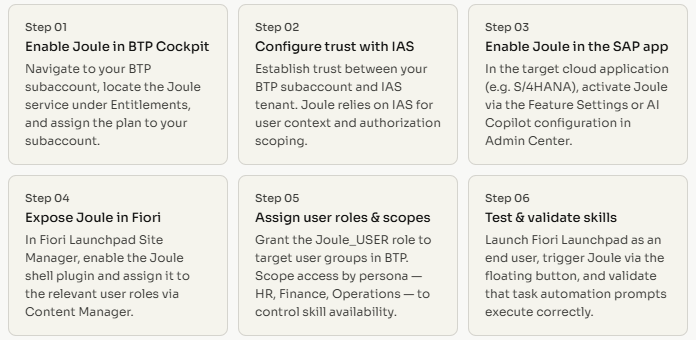
Step-by-step integration
What Joule can automate inside Fiori
After deployment, Joule will appear as a chat-style panel in the Fiori shell. Users will be able to issue commands in plain language such as, “Show my open purchase orders,” “Create a leave request for next Friday,” or “Summarize my team’s pending approvals,” and Joule will carry out the task in the background while the user remains in the shell. This is possible due to SAP’s skill library, which provides a conversational way to map intents to transactional APIs within SAP.
Customizing and extending skills
Organizations with workflows Joule doesn’t support can build new skills with SAP Build. SAP Build is the low-code development option on BTP. Custom skills are intents structured in a way that allow them to be connected to SAP and/or third-party APIs. These skills are then submitted to the Joule Skills Framework. When published, the skills are made available in the Fiori Launchpad alongside SAP skills. This provides teams the ability to use skills that automate and optimize their workflows.
Common integration pitfalls
The most common challenges associated with integration are the misconfiguration of IAS trust settings, missing role assignments in BTP, and the Joule shell plug-in is not enabled at the appropriate Fiori site level. The majority of issues after going live can be avoided by having cross-user testing, especially on the validation of the skills and their associated data in the live system.
The integration of SAP Joule into Fiori Launchpad is one of the most advantageous AI integrations of any SAP focused company. It is a highly effective integration because it automates the performance of transactional tasks and decreases the navigational challenges most users face when using SAP, all without requiring end-users to learn a new tool.