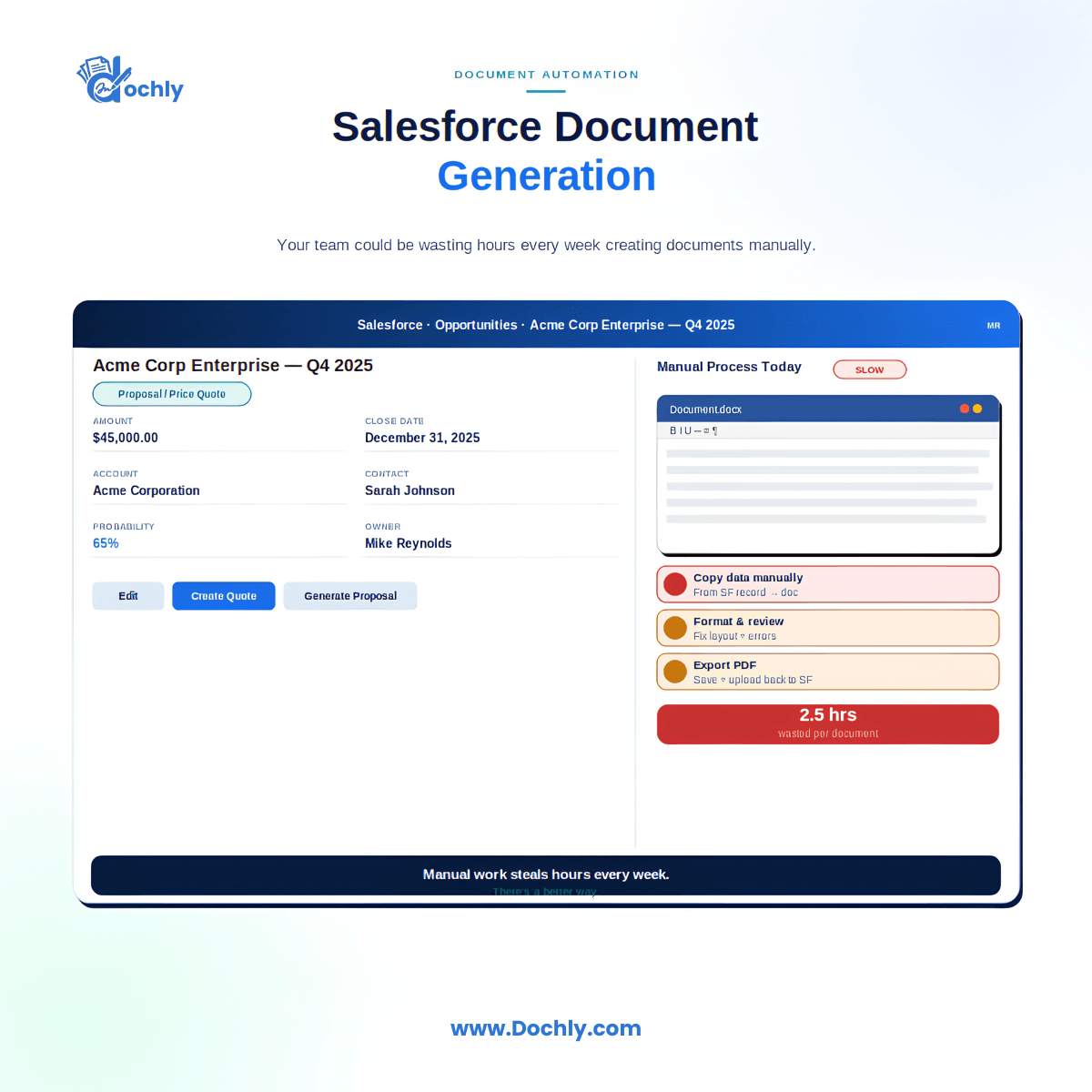
Last year I sat with a sales operations lead who showed me her team’s real workflow. A rep closed a deal in Sales Cloud. Then that rep opened a Word template, copied the account name, the contact, the pricing, and the terms by hand, saved a PDF, and emailed it out. Every single deal. When I added up the minutes, it came to several hours a week per rep. That is the quiet tax that poor Salesforce document generation puts on good teams, and most leaders never see it on a report.
I’m Muhammad Umer Balaj. I’m 9x Salesforce certified with nine years working inside orgs at companies like Wintrust, Reliant Funding, Dietitian Live, Cenegenics, LunaJoy, uBlox and Finagy. The pattern above shows up almost everywhere. The data already lives in Salesforce. The document does not. So people become the bridge, and people are slow and inconsistent.
Why manual document creation drains real hours
Copy and paste feels small. One quote takes five minutes. The problem is volume and repetition. A rep who builds twenty documents a week loses real time, and that time does not scale down when the team gets busy. It gets worse.
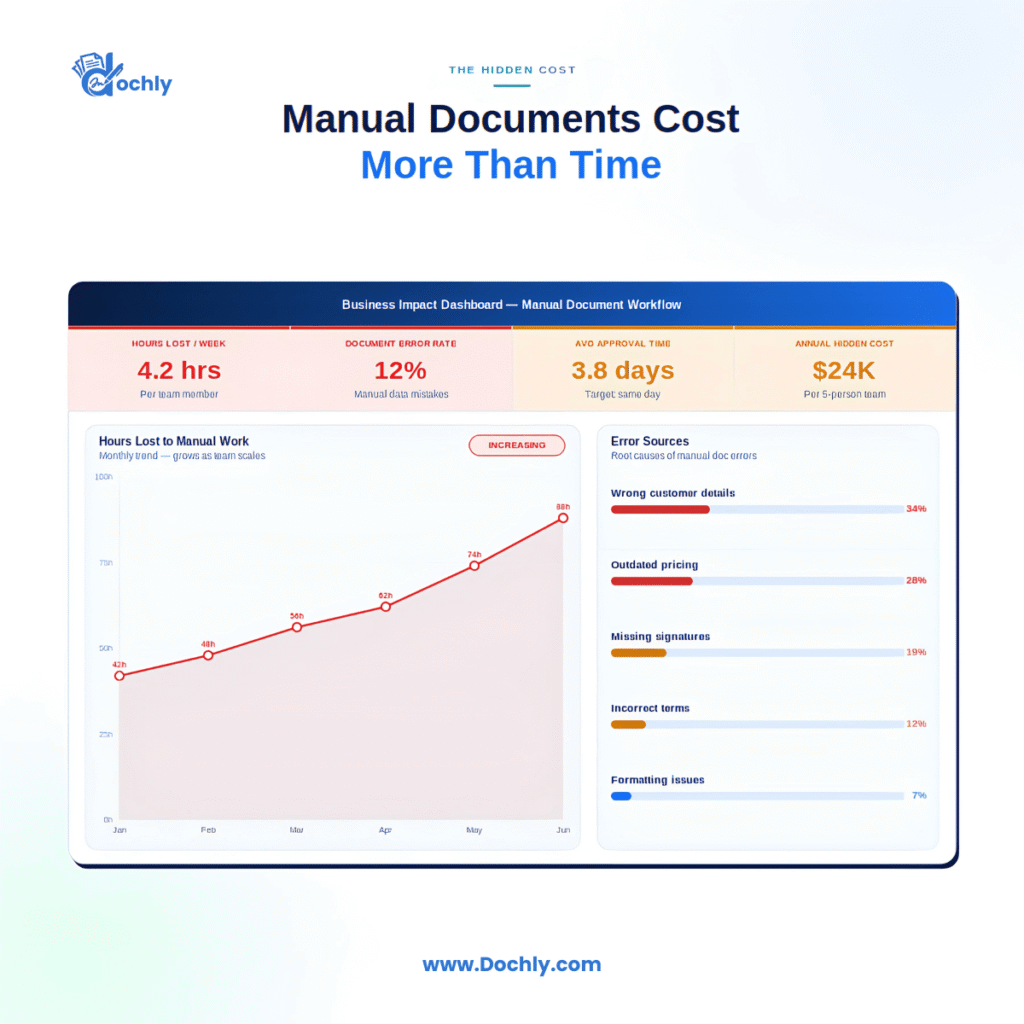
Manual work also invites mistakes. Someone forgets to update the effective date. Someone leaves the last client’s name in the footer. Now a legal document goes out wrong, and cleaning that up costs far more than the original five minutes.
Common documents teams build inside Salesforce
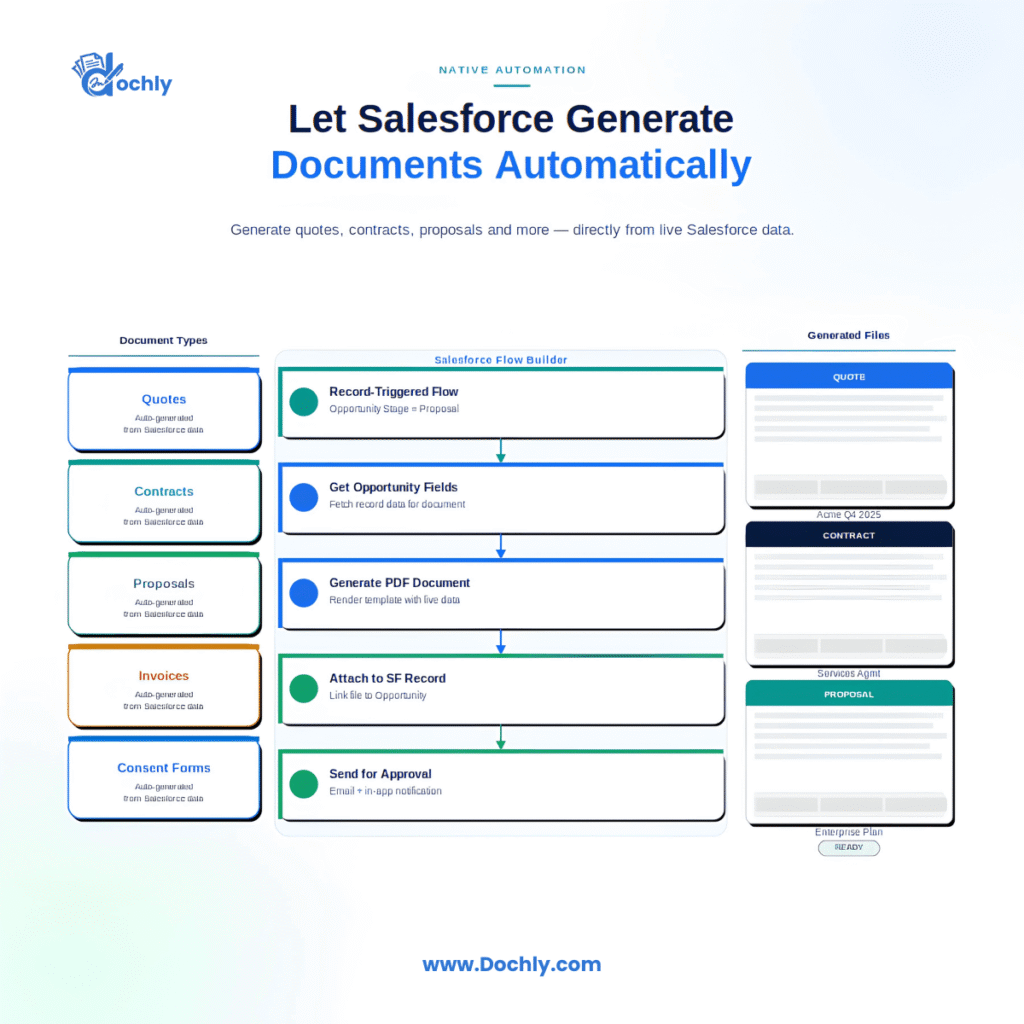
Most orgs create the same handful of documents again and again. Quotes and proposals. Order forms and invoices. Contracts and renewal agreements. Onboarding packets and welcome letters. In Service Cloud I often see case summaries and work orders. The point is simple. These are structured documents fed by structured data. That is exactly the kind of task software should handle, not a person.
The hidden costs nobody puts on a spreadsheet
The obvious cost is labor. The hidden costs run deeper.
First, there is opportunity cost. A rep formatting a PDF is not on a call. A coordinator merging fields is not helping a patient or a client. Second, there is inconsistency. When ten people build proposals from ten slightly different templates, your brand and your terms drift. Third, there is delay. A quote that takes a day to produce can lose a deal that a competitor closed the same afternoon.
I’ve watched teams try to fix this with Apex or a pile of Visualforce templates. That can work, but it becomes a maintenance burden. Every pricing change means a developer ticket. Custom code is not free just because you already own the org.
Compliance and security risks that quietly grow
This is where I get most serious with clients in healthcare and financial services. When documents get created outside Salesforce, they often land outside your controls too. Someone downloads a patient summary to a laptop. Someone stores a signed loan agreement in a personal drive. Now your careful setup of Permission Sets, record access, and sharing rules means nothing, because the sensitive file left the building.
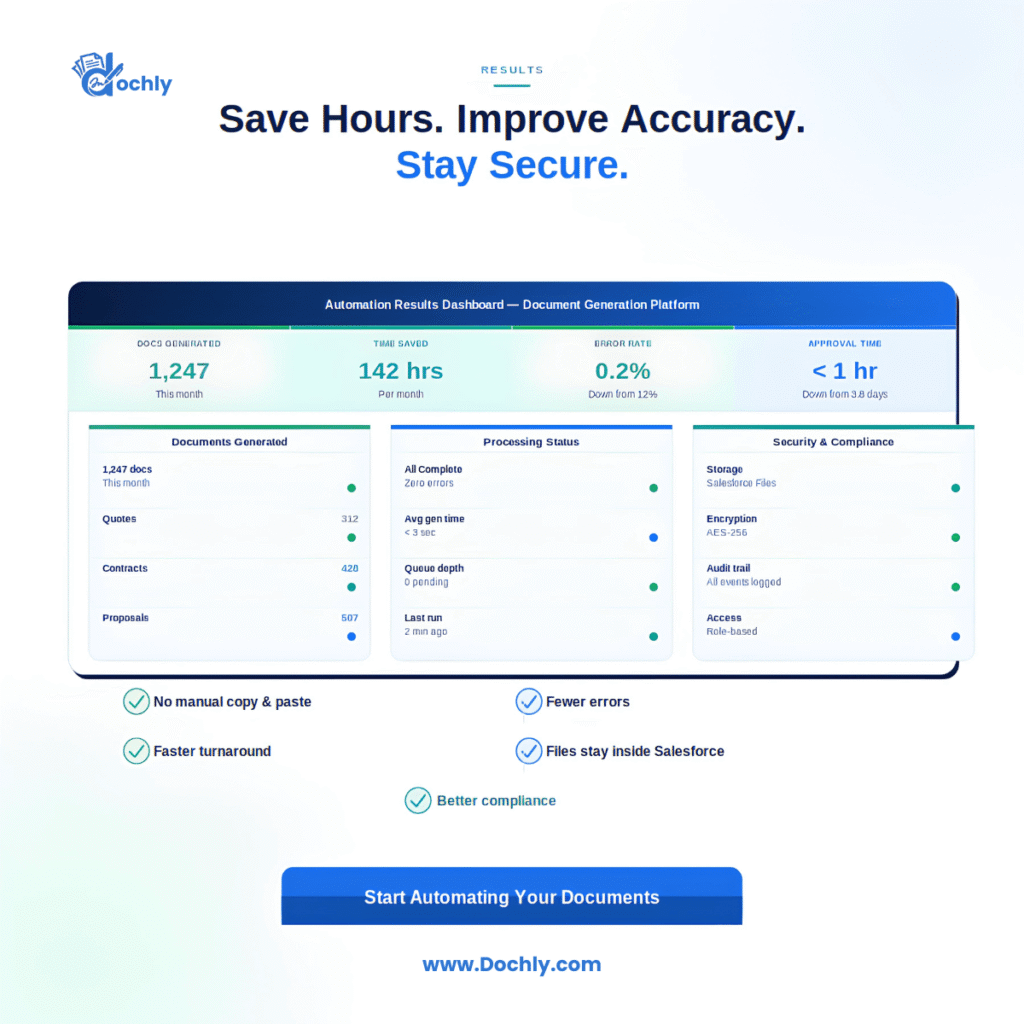
Native storage matters here. When files live in Salesforce as ContentVersion records tied to the right object, they inherit your security model. Access follows the record. Auditing is possible. For a HIPAA covered entity or a firm under financial regulation, that difference is not a nice to have. It is the whole game.
Why native Salesforce document generation wins
Disconnected tools create gaps. You export data, push it to an outside service, generate a file, then try to push it back. Every hop is a place for data to go stale, break, or leak.
A native Salesforce app keeps the work inside the platform. It reads live record data through your existing structure. It respects Flow, so you can trigger generation the moment an Approval Process finishes or a stage changes. It writes the finished file back as a Salesforce file, under your security rules. Nothing leaves. Nothing gets copied by hand.
Native also plays well with Lightning and Experience Cloud. You can let a customer generate or sign a document from a portal while your team keeps full control of the data behind it.
What this looks like across industries
In SaaS, I see teams tie quote generation to opportunity stages so the document builds itself when a deal moves forward. In financial services, disclosure packets and agreements get produced with the exact approved language every time, which auditors appreciate. In healthcare, intake and consent forms stay inside the org where access is controlled and logged. These are not exotic use cases. They are the everyday work these teams already do, just done by software instead of by hand.
Scaling without adding headcount
Manual document work has a hard ceiling. More documents means more people or more overtime. Automated Salesforce document generation scales the other way. Once a template is built and wired into Flow, it handles ten documents or ten thousand at the same quality. Your team spends its time on judgment and relationships, which is what you actually hired them for.
Practical steps I recommend
Start by listing your top five document types by volume. Those are where you will feel the fastest relief. Map the Salesforce fields each one needs so your templates pull live data instead of manual entry. Decide where files must live, and for regulated data, keep them in Salesforce storage under your security model. Then use Flow to trigger generation at the right moment rather than leaving it to memory.
If you want a native option, Dochly is one solution worth a look. It handles Salesforce document generation, eSignature, and secure file storage inside the platform, so documents and signatures stay under your existing controls. I mention it as one path, not the only one. The principle matters more than any single tool. Keep the document work where the data already lives.
The teams that win here are not the ones with the most people formatting PDFs. They are the ones who stopped doing it by hand. Pick one high volume document this month, automate it, and measure the hours you get back. That first win usually makes the rest of the case for you.
Frequently Asked Questions
What is Salesforce document generation?
It’s the process of creating documents like quotes, contracts, and invoices directly from Salesforce record data. Instead of copying fields by hand, a template pulls live data and produces a finished file inside your org.
Can I generate documents in Salesforce without custom code?
Yes. Native apps let you build templates and trigger them with Flow, so you avoid heavy Apex or Visualforce maintenance. Custom code is an option, but it usually adds long term upkeep.
Is native Salesforce document management more secure than outside tools?
Usually, yes. When files stay in Salesforce as ContentVersion records, they follow your Permission Sets, sharing rules, and record access. Files exported to outside services often lose those protections.
Does Salesforce eSignature keep data inside the platform?
A native eSignature solution keeps the document and signature tied to the Salesforce record, under your security model. That matters most for healthcare and financial services teams with strict compliance needs.