
Some jobs come with a team. Others don’t.
Think of a security guard on night rounds. Or a nurse visiting a patient alone. Or a technician at a remote site. If something goes wrong, no one is there. Lone working is common. And it is risky. The old ways of managing it – phone calls and paper logs – are not good enough anymore. That is where a working alone check-in app helps.
What Is a Working Alone Check-In App?
It is a safety tool for workers who work alone.
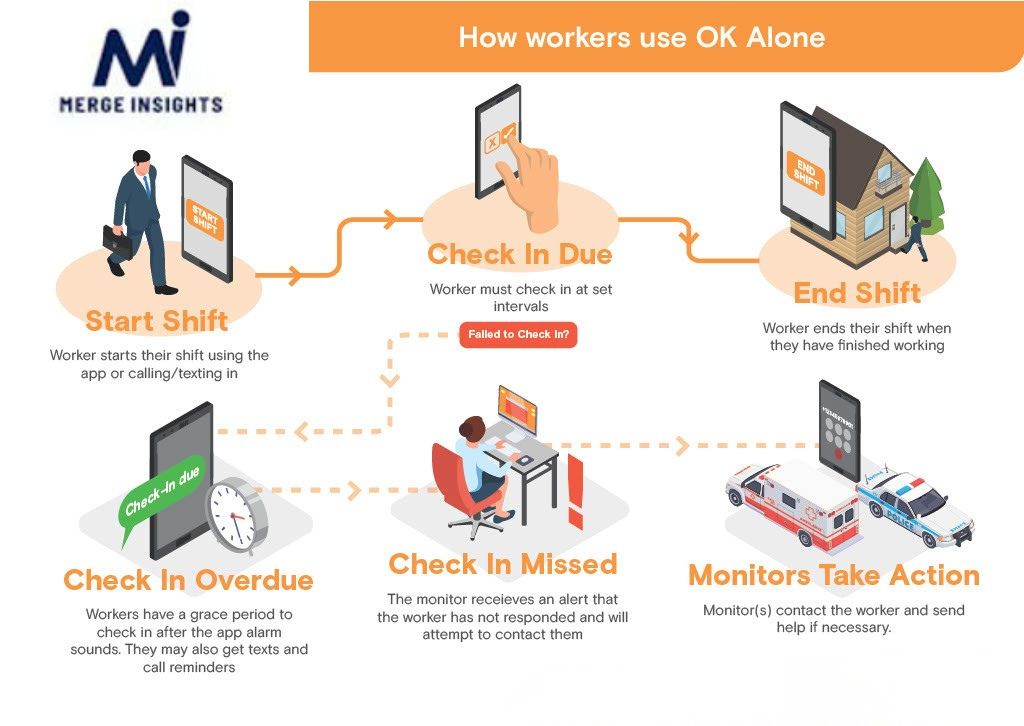
The app checks in on them during their shift. It sends a prompt. The worker confirms they are safe. Simple.
But if they miss a check-in, the app acts fast. It sends an alert to a manager or emergency contact. If no one responds, it escalates. It keeps going until someone takes action.
Most apps run on a phone. The best ones also include GPS tracking, an SOS button, and two-way messaging.
Why Lone Workers Face Greater Risk
Working with others creates a safety net. A colleague notices if you fall. Someone hears if you need help.
That safety net is gone when you work alone.
This is a real problem in construction, mining, healthcare, and transport. Workers face hazards with no one nearby. When something goes wrong, no one knows. Help comes late. Sometimes too late.
A working alone check-in app fixes that.
Key Features to Look For
Not all apps are built the same. Here is what a good one includes.
Automated check-in prompts. The app reminds workers to confirm they are safe. No manager needed.
Missed check-in alerts. If a worker does not respond, the app sends an alert right away.
GPS tracking. Responders know exactly where to go. This saves time in an emergency.
SOS button. One tap sends a distress signal. Fast and simple.
Audit logs. Every check-in is recorded. This helps with compliance and incident reports.
How a Working Alone Check-In App Fits Into Workforce Management Software Australia
A check-in app works best as part of a bigger system.
Businesses using workforce management software Australia platforms are now adding lone worker tools to the same place. Safety, scheduling, and compliance all connect in one platform.
This matters for Australian businesses. Work Health and Safety laws require employers to protect all workers. That includes people working alone. An integrated system makes it easy to prove you are meeting that duty.
It also gives managers better visibility. They can see who is on shift. Where workers are. When they last checked in. If something looks wrong, they can act early.
Using a working alone check-in app with workforce management software Australia is fast becoming the smart standard.
The Real Cost of Going Without One
Most businesses only think about this after something goes wrong.
By then, it is too late.
There is the human cost first. A worker who waits too long for help faces a much worse outcome.
Then come the bills. WHS fines. Legal fees. Compensation claims. Higher insurance costs.
A working alone check-in app costs far less than all of that.
Final Thoughts
Lone worker safety is not just a legal box to tick. It shows how much a business cares about its people.
A working alone check-in app keeps workers connected no matter where they are. It removes the guesswork. Managers know who is safe. Workers know someone has their back.
The risks of lone working are real. The solutions are simple. A good working alone check-in app gives workers a direct line to help when they need it most. That peace of mind matters, both for the worker in the field and the manager back at base.
Pair it with workforce management software and the benefits go even further. Managers get full visibility across the team. Scheduling, compliance, and safety all sit in one place. Nothing falls through the cracks.
For Australian businesses, this is not just best practice. It is fast becoming the expected standard under WHS laws.
If anyone on your team works alone, act now. The right tools are available. The cost of not using them is far greater than the cost of putting them in place.